

Ihr Computer meldet „NTLDR fehlt“ oder „BOOTMGR fehlt“ und fährt nicht mehr hoch? Dann lesen Sie hier, wie Sie das Startproblem lösen können.
NTLDR fehlt kann einfache Ursache haben
Die einfachste Ursache kann ein vergessenes Laufwerksmedium sein, von dem Ihr Computer starten will:
- Diskette im Laufwerk
- CD oder DVD
- USB-Stick
In diesem Fall sollte es genügen, die Medien zu entfernen und den Computer neu zu starten.
BIOS-Reihenfolge falsch eingestellt
Weitere mögliche Ursache: Eine falsch eingestellte Boot-Reihenfolge im BIOS.
- In diesem Fall starten Sie Ihren Computer neu und öffnen Sie die BIOS-Einstellungen.
- Anschließend stellen Sie die richtige Startreihenfolge wieder ein.
NTLDR und MBR automatisch wiederherstellen
Die Ursache ist oft ein defekter Master Boot Record, kurz MBR.
Den MBR können Sie aber einfach wieder herstellen.
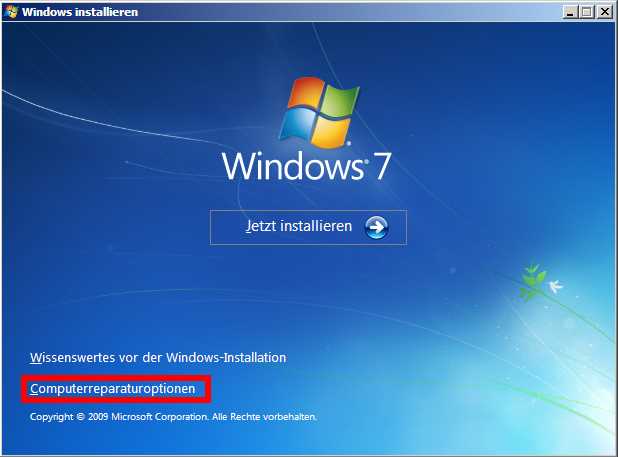
- Starten Sie Ihren PC mit dem Installationsdatenträger, also etwa der DVD von Windows 7.
- Nach der Bestätigung der Installationssprache sehen Sie den großen Button zum Installieren. Den lassen Sie aber links liegen und klicken stattdessen auf die Computerreparaturoptionen.
- Nun sucht das Reparaturprogramm nach den vorhandenen Windows-Installationen und führt nach Ihrer Bestätigung automatisch eine Prüfung und Reparatur durch. In den meisten Fällen klappt es danach mit dem Windows-Start wieder.
NTLDR und MBR manuell wiederherstellen
Klappt es mit der Automatik nicht, können Sie versuchen, die notwendigen Module für den Systemstart über ein Kommandozeilenprogramm wiederherzustellen.
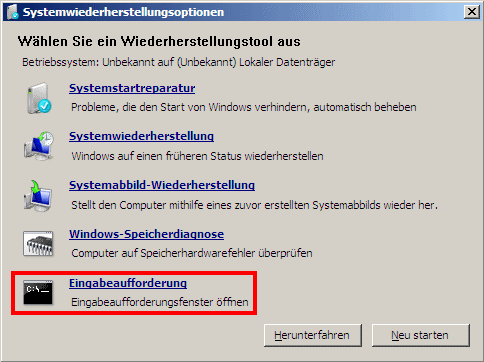
- Starten Sie die Reparaturoptionen wie oben gezeigt, wählen die Computerrepaturoptionen aus und starten die Systemwiederherstellungsoptionen.
- Hier gehen Sie auf den letzten Punkt Eingabeaufforderung.
- Im Gegensatz zu früheren Windows-Versionen gibt es nicht einzelne Tools für die verschiedenen Startbereiche. Stattdessen sind sie unter einem neuen Befehl namens bootrec zusammengefasst.
- Sobald die Kommandozeile erscheint, geben Sie die drei folgenden Befehle hintereinander ein:
bootrec /fixmbrbootrec /fixbootbootrec /rebuildbcd - Starten Sie den Computer neu.
***
